Posts

Showing posts with the label ios11

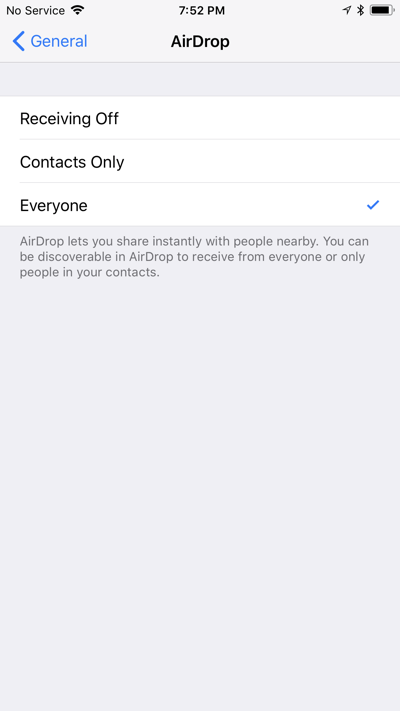
AirDrop Sharing

Image
The following information is from CISD Director of Instructional Technology, Nancy Garvey. Recently, the Digital Learning Coaches reviewed the instructional relevance of enabling the Airdrop feature on shared iPads and determined that the feature continues to be valid in an educational setting. AirDrop allows Macbooks and iOS devices to share files wirelessly via bluetooth. Listed below are some ways that you may consider using Airdrop in your classroom: Airdropping a website from one iPad to another, which is great if they want to bookmark to read later Quickly collect digital assignments (Notability notes, products created with other iOS apps) Share learner in-progress work on a projector/presentation station Educators can send documents, assignment details, presentations to learners Return feedback in the form of notes to learners Facilitate guided or small group instruction and share information between educators and learners Send an image or crea...

TMST: Scanning in Notes

Image
My love affair with iOS11 continues this week with a small nugget of awesome found within the native Notes app. Like most mind blowing things, this tip is small, but mighty. Let's take a quick look at how the Notes App has been redesigned in iOS11 to allow you as an educator to scan and mark up documents.   And, just in case you wondered, the Notes App can be great for our learners too!   Intrigued?  Want to learn more?   Check out what else Notes can do:  https://support.apple.com/en-us/HT205773 What awesome small nuggets of learning have rocked your world lately?  Let me know in the comments!

Time to Update to iOS 11

iOS 11  is here and we have received word from the technology department that it is ok to update.   Updates often take a few minutes; therefore, staggering or allowing extra time for updating is a good practice. I have also found that updating goes faster when devices are plugged in.   If you are concerned about losing content on your device, it is recommended that you/your learners create a backup in iCloud before running the update. 1:1~ Please encourage your learners to update: ​prior to lunch/recess prior to specials prior to leaving for the end of the school day in small groups/shifts Shared (K-3) ~   At this time, older iPad 4’s and iPad minis will not update to iOS 11. prior to leaving for the end of the school day or a weekend In small groups/shifts Educator iPads ~ Please update at your convenience: From home/overnight At the beginning/end of the day iOS 11 has several features that are awesome for educati...

TMST: iOS 11 Screencasting

Image
Shout it from the rooftops...iOS 11 is here!   Never in my life did I think I would be this nerdy happy over a software update, but y'all, this one changes the game.   With iOS 11, we can screencast DIRECTLY from the iPad. I'm excited, not just because I can make quick app demo videos for this crazy blog, but because of what this can do for our learners.  With iOS 11 screencasting, they will be able to: model their thinking, recording how they attack a problem create reflection videos  record ideas and "aha moments" as they review and interact with classroom materials share their thoughts about a book snap or article add "how to" screencasts to collaborative tools like a Schoology Media Album or Flipgrid I was lucky to partner with one of our 5th grade classes this week to test it out.  Ms. Voltz's class (Red5) was testing out the update to iOS 11 and so she asked me to come lend a hand.  We taught the kids a little a...