Posts

Showing posts with the label Flipgrid

Making Connections

Image
I'm so excited to have co-written a blogpost over at my friends, Monica and Kelly's blog, Teacher Tech Tools in Under 2 Minutes this week. Hop over using the link below to learn more about an awesome collaboration project between our campuses that proves that no matter what the age of the learner, connections help us construct meaning.   Connecting, Collaborating, Creating

Apple in Education, We Say Yes!

Image
I’m so excited to be blogging from the TCEA (Texas Computer Education Association) conference in Austin, Texas this week! My team and I will be presenting several different sessions and I am so excited to be co-presenting “Apple in Education, We Say Yes!” on Thursday at 1:30! My Awesome Co-Presenters! In our session, we will celebrate the use of Apple in our district and encourage others to see the amazing educational value of Keynote, Pages, Numbers and Everyone Can Code.  Even if you are #notattcea, I encourage you to learn with us for this week’s installment of #anappleaweek. Simply go to www.flipgrid.com/AppleEDUyes , select a learning topic and click on the attached resource to begin exploring.   Attending TCEA and interested in more learning from the Coppell DLCs? Check out all of our session offerings below! Follow #TCEA and #TCEA18 for more great learning opportunities!   Check out other posts from this series here.
Attitude of Gratitude

Image
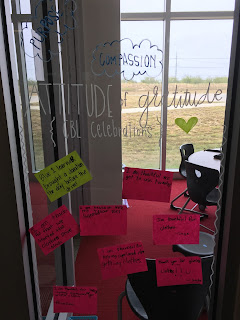
If you have been following my Twitter feed lately, you've seen me use #gratitude a lot. It is because my team has challenged ourselves to spend 21 days of gratitude. I'm finding it is helping me see my world using a lens of positivity and growth. Speaking of gratitude, we’ve now entered November, and what better time for our learners to celebrate our gratitude than the month of Thanksgiving? "Attitude of Gratitude" Wall in Stephanie Shannon's 2nd grade space at RJL My teammate, Sam Neal , has created a FlipGrid just for that purpose. We are inviting you all to share your own gratitude and to use this is a reflection space for your learners! There are 21 Days of Gratitude sentence stems on the FlipGrid if anyone would like to use that as inspiration or to help the learners express what they’re grateful for. Feel free to use this resource or ignore it completely! A neat feature you might also explore with your learners is the ability to resp...

TMST: Techno Treats

Image
Happy Halloween, Readers! My blog today is devoted to providing you some quick "techno" treats, aka things that are rocking my world this week! 1.  FlipGrid Connections and Discovery  Did you ever wish you could find other classrooms' global projects and invite others to participate easily in yours?   Put down the Google Search because FlipGrid's new Connections area changes the game.    FlipGrid Connections Also exciting is the new Discovery section.  Not only can you search for topics to add to your own grids, but you can add and share topics with other educators too.  This feature is great when you want to share a topic out with other classrooms, but you don't want to include learner videos.  They act as "templates" only. FlipGrid Discovery 2.  Seesaw Activities I am loving the addition of the ability to assign and create activities for learners in Seesaw.  Not only does it orga...

Dot Day is coming!

Image
I am so excited to be partnering with our awesome Media Specialists more this year! These 2 awesome ladies and their team are TOP NOTCH and they have inspired me to share a few resources for Dot Day (Sept. 15), a celebration of creativity and individuality.   What is Dot Day and how can it be celebrated?  My friend, Cynthia Alaniz ( @utalaniz ), created this S'more that explains it beautifully.  You'll also be able to learn about what she is doing with our campus this week!   I 'm also excited to partner with Melinda Mangum ( @melmangum ) at my other campus.  We will be working with our Breakout EDU kits to try this Dot Day Breakout with our learners! Other Dot Day 2017 Awesomeness My amazing teammate, Amanda Rogers ( @TheEdsaneT ) and our Math Director for the district, Mary Kemper  ( @MrsKemper ) created a global FlipGrid Project for anyone to "Leave their Mark" for Dot Day! Image Credit:  Amanda Rogers and Mary Kemper ...

Week 2 is Here!

Image
I had such a great 1st week last week, supporting both campuses. Both campuses were able to get K-3 iPads out and classrooms began working through the  Digital Literacy Overview  (due date Sept 4.) and  1st login  experience. I am LOVING the Flipgrid responses our kiddos have been sharing as reflection. In addition, I was able to check in with our new hires, something I will continue to do over the coming weeks and months.  I sent them the picture below but I am pretty sure we could all use the message as we head into week 2. We may doubt ourselves from time to time, but Ryan's got our backs. This week starts 1:1 rollout and knowing our educators, they are beyond ready.  I will be off campus a bit to support some other campuses, but am looking forward to supporting our campuses too. As always, you can find my schedule at the My Schedule link at the top of this blog. Did you miss last week's post about starting with S...

TMST: Flipping Out with FlipGrid

Image
This week I'd love to encourage you to learn by doing!  I've talked a little about Flipgrid with some of you and I know some of you are thinking of using it soon or have had learners use it during  Jodie Deinhammer's Earth Day global project . So instead of me writing about it, let's have some fun...no stress, you get to wear your learner hat for this exercise! Step 1 Download the Flipgrid App  and enter my grid by using the code   xy69faa or  Go to directly to my FlipGrid by following this link  https://flipgrid.com/xy69faa Step 2 Pick one (or more) of my topics and record a short video response. Don't let me be the only one talking to myself! Step 3 (optional, but fun)  Watch someone else's video responses. Y ou do not need to set up an account to participate as a learner in a grid, but you would want to if you decide to create one to use with your class. Educators get one grid like my example above to host video topics...