Posts

Showing posts with the label workflow

TMST: One Word 2019

Image
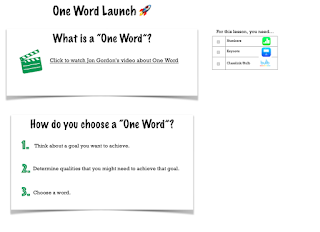
If you have read my blog awhile, you know that I'm not one for big, sweeping New Year's resolutions.  Instead, I go through a process to pick a word to strive toward for the year.  I originally wrote about One Word in 2016 and over the years it has become a tradition for me and many of the educators and learners with which I work.   What is One Word?  Learn more from Jon Gordon here . What will YOUR word be?  What words will your learners strive toward?   Because this is a valued tradition of mine, I built a quick Numbers workflow that can help lead your learners through a process for selecting their words.  Simply click the link below, download the file and airdrop a copy to your learners. One Word Numbers Template This year, my word chose me by way of my best friend, who basically told me what I needed to do.  The more I thought about the word, the more I could see that she was right. So this year, I'l...

TMST: Thinking Inside & Outside the Box

Image
Once of my favorite articles I read last year was about the concept of innerput.  We all need time to digest and process information that we are learning.  That thinking time that happens between input and output is where the learning magic happens...the innerput. Read more about the concept in the article below. Less Input and More Innerput: Take Time to Internalize Information As with the input and output stage of a lesson design, innerput doesn't have to involve digital tools.  There are many ways for learners to make their thinking visible without technology at all.  What technology can do, however, is provide our learners with another outlet to interact with and apply information. So in today's post, we will take a digital spin on thinking maps, a great way for our learners to process the information that they are learning and make connections between concepts. Keynote  Share this Keynote template that my teammate, Kelly Skillingberg , mad...

TMST: Working on Workflow

Image
This week, I have been thinking a lot about workflow and how it can make or break a learning experience.  It is no educator's dream to have a beautifully designed lesson stall because the learners are unable to show their thinking digitally in an efficient way.  I've seen this time and again...many times because in my own rush and excitement of content, I take for granted helping my learners practice the process of work on their iPads. It makes me think of all the procedures and expectations I used to have my learners practice at the beginning of the year.  Though that practice was an investment in time, it consistently paid me back with prepared learners throughout the year. That's why taking time to help learners with digital workflow is so important.  I'll be visiting this topic frequently on this blog this year, but for today, let's consider my top 3 tips for helping learners with the process of work. Tip 1 - The more you use your iPad as an educat...